

Email marketing for your vintage shop, part 2: Creating compelling content
If you’ve noticed a dip in engagement on social media, consider sending a newsletter so you can talk vintage directly with potential customers. We share advice on building a newsletter list in part two of our series
Catch up on why email is a great marketing tool and how to collect email addresses in part 1 of our series before moving onto this one.
Part two covers what the heck you should put in these emails.
What kind of content will you send?
Do you want to use emails to promote new collections, sales, drops or goings-on at your shop?
Keep them short and sweet, with a big image and a button.
Do you want to connect with your customers?
Offer them something of value, like a personal anecdote that ties into a bigger theme, or show some behind-the-scenes of what you do.
Use an e-newsletter format to expand on the kind of stuff you share on social media — give your readers some exclusive content they’re not going to see on there or on your website.
Share some extra behind-the-scenes photos, give special discounts for a sale you’re running on social media or in your Etsy shop, etc.
While email marketing is ultimately a way to promote your shop, the best ones follow the 90-10 rule, which means 90% educational content and 10% promotional content.
Stumped for content ideas? Check out this list of 50 newsletter ideas from the folks at Campaign Monitor.
Create a simple, easy-to-digest email
Emails that take longer than a few minutes to read are less likely to be…well, read. Make your emails scannable and keep them on the shorter side.
If you’re writing long paragraphs, consider breaking them up into very small chunks or even single lines. A good tip is to write your newsletter, then go back and edit with the goal of shortening it while retaining meaning.
Use headings and buttons to break up the newsletter visually. Most providers will include drag-and-drop templates that make this fairly easy to do.
Newsletters perform better when there are visuals, so include images, gifs and video when possible. Ideas for images might include:
- Product shots of your inventory
- Editorial/styled vignettes
- Personal photos
- Collages, etc.
Alt text for images (the text that’s shown when an image hasn’t loaded) is key for emails, as many people use email clients that don’t automatically show pictures. Give them a taste of what the image contains so that they'll know if they want to download the images or not.
For best results, choose responsive email templates that are mobile-friendly and that display nicely in both light mode or dark mode. You may need to send a test email to yourself to determine if it looks good in dark mode.
Choosing the right email provider
You've thought about what type of content to send, so choose the email provider that fits your goals best.
If you are running a Shopify website, they have email marketing included as a feature.
Most other email providers charge to send emails, but there are some free plans out there that will allow you to send a certain amount of emails per month for free to a limited number of subscribers.
Compare plans and pay attention to when you have to scale up to a new plan for each — most go by number of subscribers.
Some common ones:
- Mailchimp
- HubSpot
- Substack
- Moosend
- MailerLite
- Convert Kit
- AWeber
- Campaign Monitor
- Flodesk
- Shopify
- Other web hosting providers (i.e. Squarespace, GoDaddy, etc. — they tend not to be the cheapest options, though they do make integrating your website content into your e-newsletters very easy.)
What you need to know about anti-spam
All emails must have an unsubscribe button as per Canadian Anti-Spam Law (CASL), CAN-SPAM Act in the U.S., or General Data Protection Regulation (GDPR) rules in the European Union. Email providers make this very easy to include and it's built into their templates.
Anti-spam law is a bit complicated, but the most important things to know are: 1) there are two types of consent: express and implied. And 2) if you don’t follow the anti-spam rules and someone reports you, the fines can be steep (like tens of thousands of dollars steep).
Express consent is when someone has agreed (either in writing or verbally) that they want to receive a commercial email from you. Usually this means the person has signed up for your email list on their own. When you have express consent, you can email people on your list as much as you want until they say they want to unsubscribe.
A double opt-in (sending a confirmation email after they sign up to ensure they really, really want to sign up — you can set this up in most email providers quite easily) is your safest bet at ensuring your list is CASL- or CAN-SPAM compliant, but it is not required if you have express consent.
Implied consent has a time limit and is only applicable if you have an existing business relationship with the person to whom you are sending the message: for example if they have purchased something from you, sent you a question, or made their email address public (i.e. on their business website or on a business card).
Implied consent only lasts two years in most cases, meaning at that point you need to email to ask for express consent if you want to keep emailing. If you don’t get that consent, you can’t email that address anymore.
Using implied consent means constantly tracking your emails to ensure you aren’t emailing anyone outside of the two-year window.
For more information:
CASL
CAN-SPAM
GDPR
Continued below
Get 1:1 support for your shop
Book a strategy session
Continued from above
Catch up on why email is a great marketing tool and how to collect email addresses in part 1 here.
This article covers what the heck you should put in these emails.
What kind of content will you send?
Do you want to use emails to promote new collections, sales, drops or goings-on at your shop?
Keep them short and sweet, with a big image and a button.
Do you want to connect with your customers?
Offer them something of value, like a personal anecdote that ties into a bigger theme, or show some behind-the-scenes of what you do.
Use an e-newsletter format to expand on the kind of stuff you share on social media — give your readers some exclusive content they’re not going to see on there or on your website.
Share some extra behind-the-scenes photos, give special discounts for a sale you’re running on social media or in your Etsy shop, etc.
While email marketing is ultimately a way to promote your shop, the best ones follow the 90-10 rule, which means 90% educational content and 10% promotional content.
Stumped for content ideas? Check out this list of 50 newsletter ideas from the folks at Campaign Monitor.
Create a simple, easy-to-digest email
Emails that take longer than a few minutes to read are less likely to be…well, read. Make your emails scannable and keep them on the shorter side.
If you’re writing long paragraphs, consider breaking them up into very small chunks or even single lines. A good tip is to write your newsletter, then go back and edit with the goal of shortening it while retaining meaning.
Use headings and buttons to break up the newsletter visually. Most providers will include drag-and-drop templates that make this fairly easy to do.
Newsletters perform better when there are visuals, so include images, gifs and video when possible. Ideas for images might include:
- Product shots of your inventory
- Editorial/styled vignettes
- Personal photos
- Collages, etc.
Alt text for images (the text that’s shown when an image hasn’t loaded) is key for emails, as many people use email clients that don’t automatically show pictures. Give them a taste of what the image contains so that they'll know if they want to download the images or not.
For best results, choose responsive email templates that are mobile-friendly and that display nicely in both light mode or dark mode. You may need to send a test email to yourself to determine if it looks good in dark mode.
Choosing the right email provider
You've thought about what type of content to send, so choose the email provider that fits your goals best.
If you are running a Shopify website, they have email marketing included as a feature.
Most other email providers charge to send emails, but there are some free plans out there that will allow you to send a certain amount of emails per month for free to a limited number of subscribers.
Compare plans and pay attention to when you have to scale up to a new plan for each — most go by number of subscribers.
Some common ones:
- Mailchimp
- HubSpot
- Substack
- Moosend
- MailerLite
- Convert Kit
- AWeber
- Campaign Monitor
- Flodesk
- Shopify
- Other web hosting providers (i.e. Squarespace, GoDaddy, etc. — they tend not to be the cheapest options, though they do make integrating your website content into your e-newsletters very easy.)
What you need to know about anti-spam
All emails must have an unsubscribe button as per Canadian Anti-Spam Law (CASL), CAN-SPAM Act in the U.S., or General Data Protection Regulation (GDPR) rules in the European Union. Email providers make this very easy to include and it's built into their templates.
Anti-spam law is a bit complicated, but the most important things to know are: 1) there are two types of consent: express and implied. And 2) if you don’t follow the anti-spam rules and someone reports you, the fines can be steep (like tens of thousands of dollars steep).
Express consent is when someone has agreed (either in writing or verbally) that they want to receive a commercial email from you. Usually this means the person has signed up for your email list on their own. When you have express consent, you can email people on your list as much as you want until they say they want to unsubscribe.
A double opt-in (sending a confirmation email after they sign up to ensure they really, really want to sign up — you can set this up in most email providers quite easily) is your safest bet at ensuring your list is CASL- or CAN-SPAM compliant, but it is not required if you have express consent.
Implied consent has a time limit and is only applicable if you have an existing business relationship with the person to whom you are sending the message: for example if they have purchased something from you, sent you a question, or made their email address public (i.e. on their business website or on a business card).
Implied consent only lasts two years in most cases, meaning at that point you need to email to ask for express consent if you want to keep emailing. If you don’t get that consent, you can’t email that address anymore.
Using implied consent means constantly tracking your emails to ensure you aren’t emailing anyone outside of the two-year window.
For more information:
CASL
CAN-SPAM
GDPR
Make your subject lines enticing
You want your potential customers to find opening your email irresistible. Try asking a question, inviting them to take action, telling them about a deliverable, or including an emoji.
For example, a shop that is featuring a beach-themed collection might go with something like: "Bring the beach home with you with our new vintage drop" or "Fun in the sun: Shop our beach decor now!"
Some good best practices:
- Keep them fairly short
- Introduce your brand tone (maybe you are funny or cheeky)
- Use "your" and "you" (make it about your subscriber!)
- Using numbers or lists
- "Big news" etc. to entice an announcement
- Don't forget the preheader text or pretext -- the little line of copy that appears under the subject line (a great place to put a call to action, like "Save 30% on glassware!")
You may find these subject lines easy to write if you know the types of people on your email list or who your ideal customer is, but if you're having trouble coming up with some, consult this list of 75 retail subject lines from Campaign Monitor, or try ChatGPT.
Include a call to action
Your emails are a place to promote your shop URL, your social media pages, your website, etc. Don’t be shy — include them all in the footer and the most important ones in the header — but feature one main call to action (CTA) or thing you want your potential customers to do via a button.
Consider your focus — if it’s to drive traffic to your web shop, your main call to action should be to visit your shop URL.
If your goal is brand awareness, you may want to make your call to action to “share this newsletter.”
If it’s engagement, your call to action may be to ask readers a question and get them to respond to your email with a comment.
If it's to promote a sale or discount, give your subscribers a promo code and invite them to redeem the code.
Test your emails
Send yourself a test deployment of your email before you send it out and click on every link inside. It’s a proofreading opportunity, but it will also help you catch missing subject lines, misaligned images or non-working hyperlinks.
A/B testing is also a good idea — duplicate your email campaign with a different subject line and send each one to half your email list. Observe the analytics of each a few days after deployment to see which performs better, and make note for next time.
Monitor your analytics
Generally, links in the top third of a newsletter will get the most clicks. That’s because the first third is the most-read part of a newsletter. Put your most important information up near the top.
And then keep track: What kind of content is getting the most clicks? Double down on that content. Remove things or sections that aren’t getting clicks.
For more on tracking analytics for your shop, click here.
Reseller email examples
Some noteworthy promo emails and newsletters from resellers I've been receiving lately:
News announcement
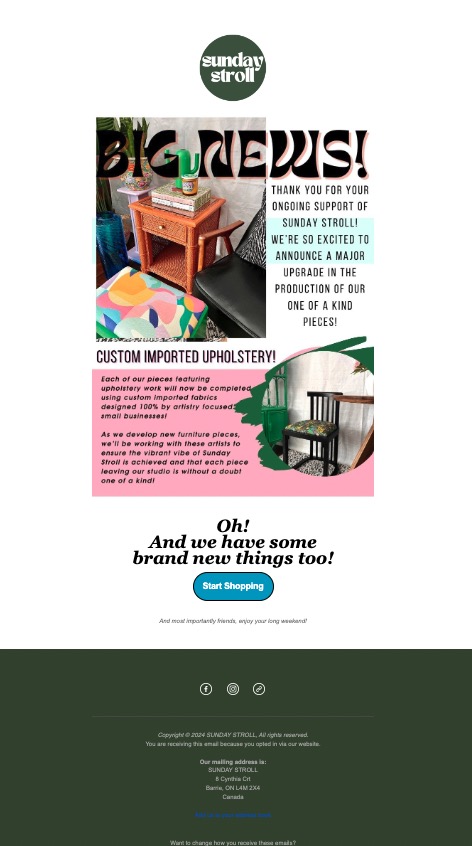
Media feature/promotion/testimonial
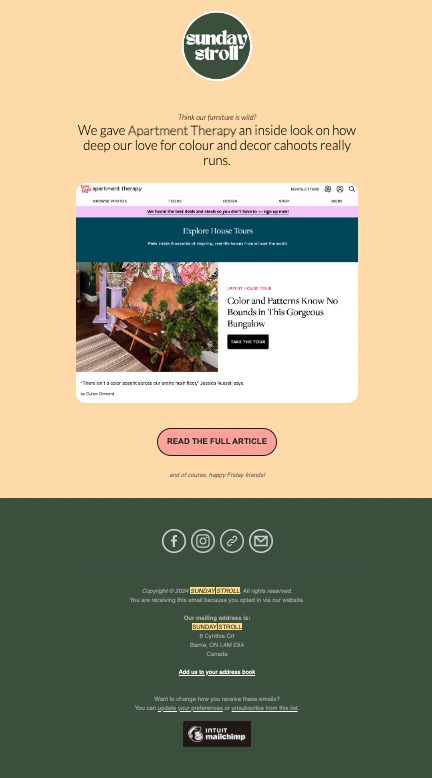
Product email
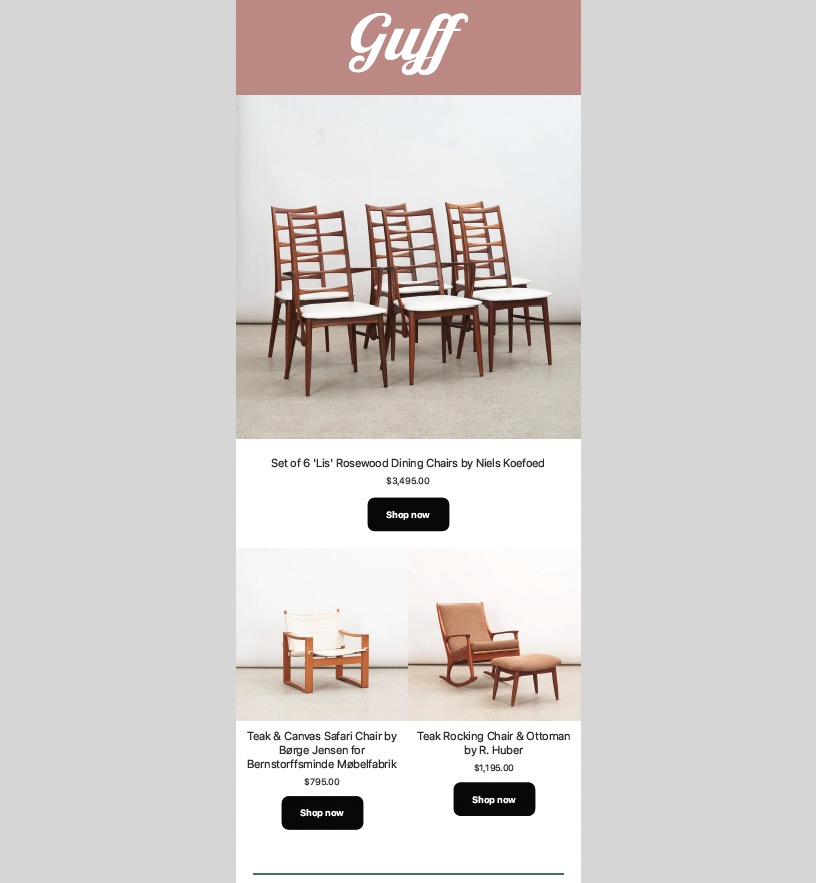
Something is different announcement (hours change)
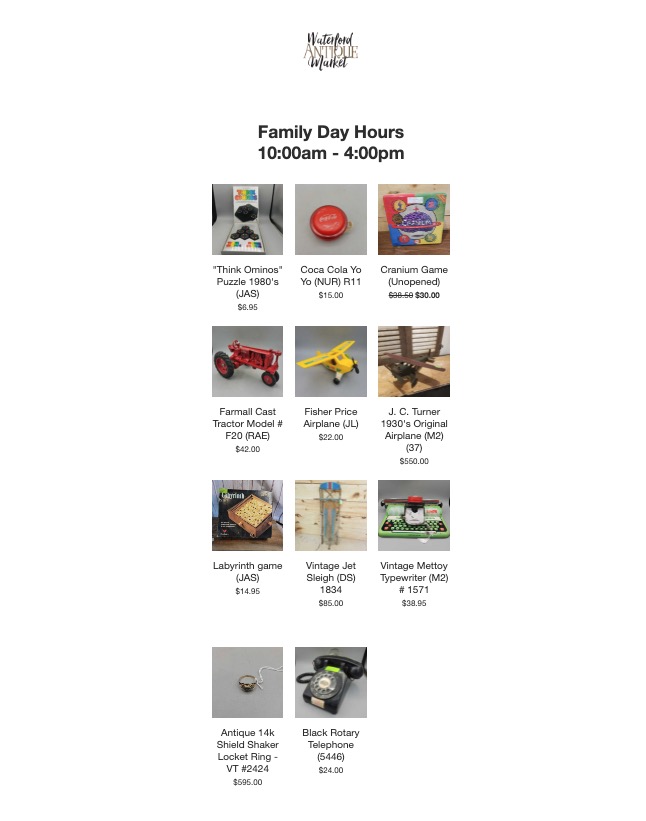
Drop announcement
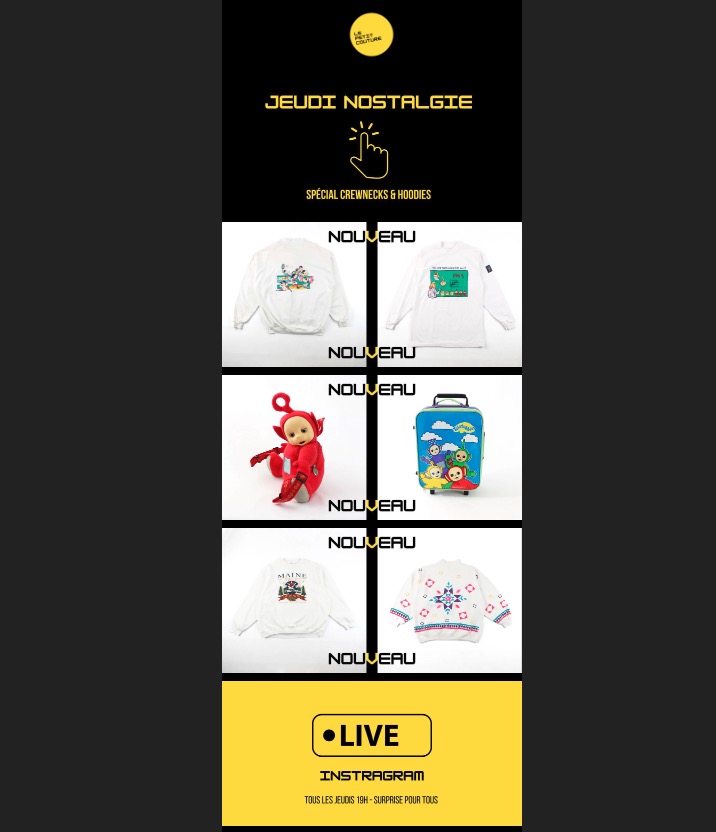
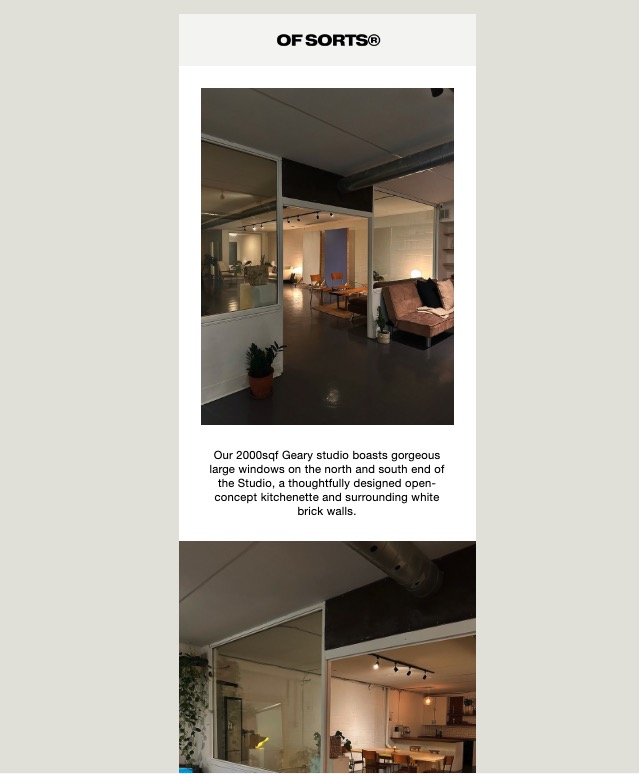
Behind-the-scenes/service email
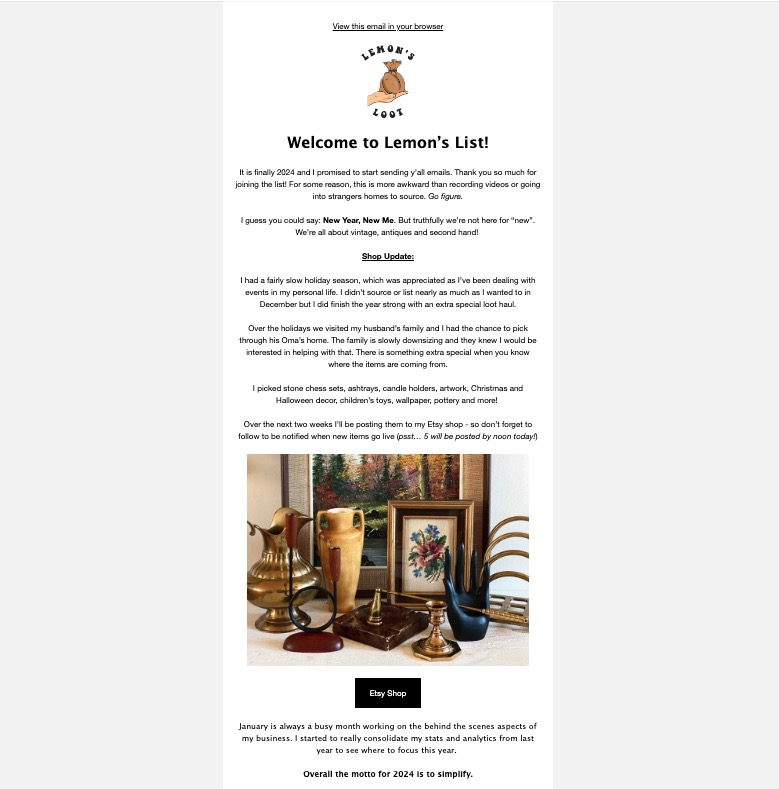
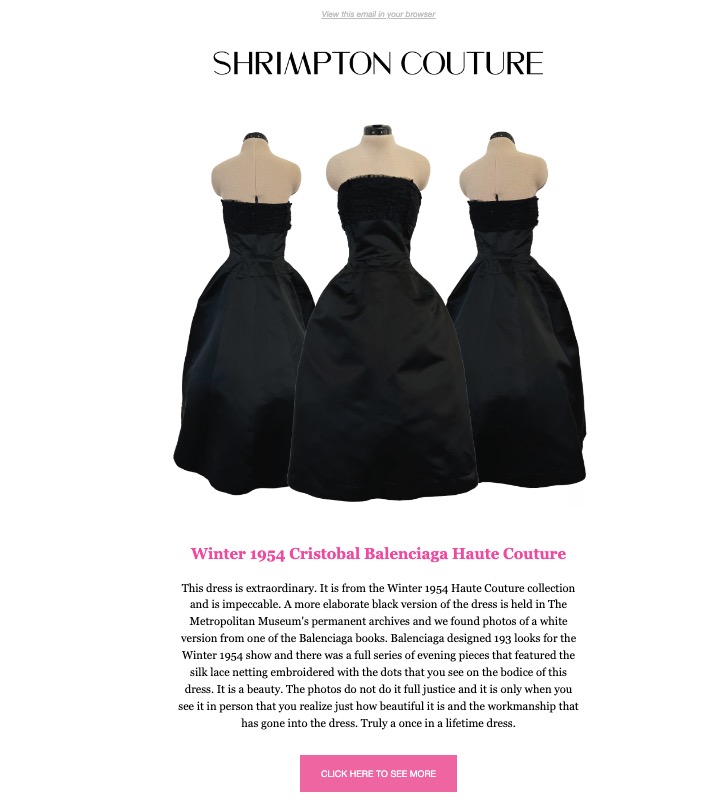
History/educational product email
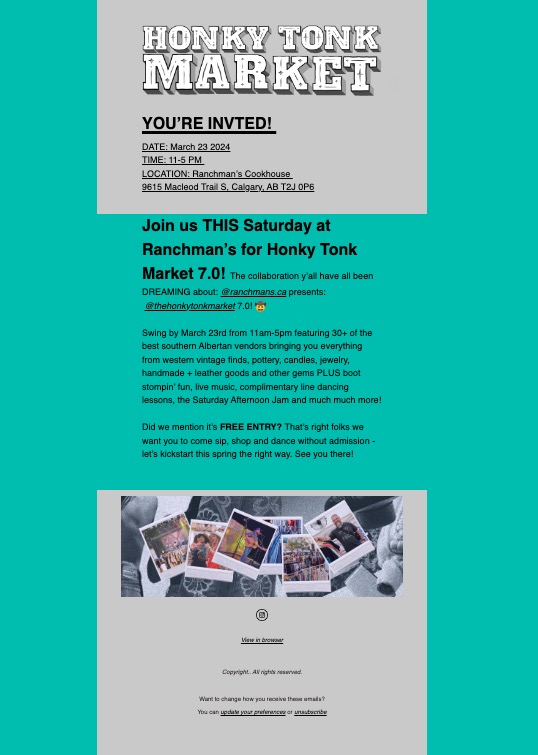
Event email
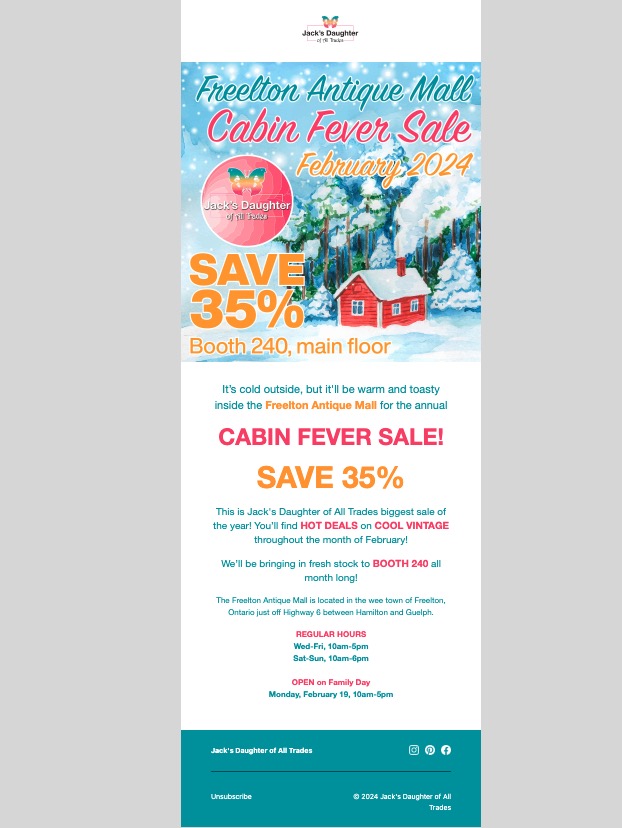
Promotion/sale email
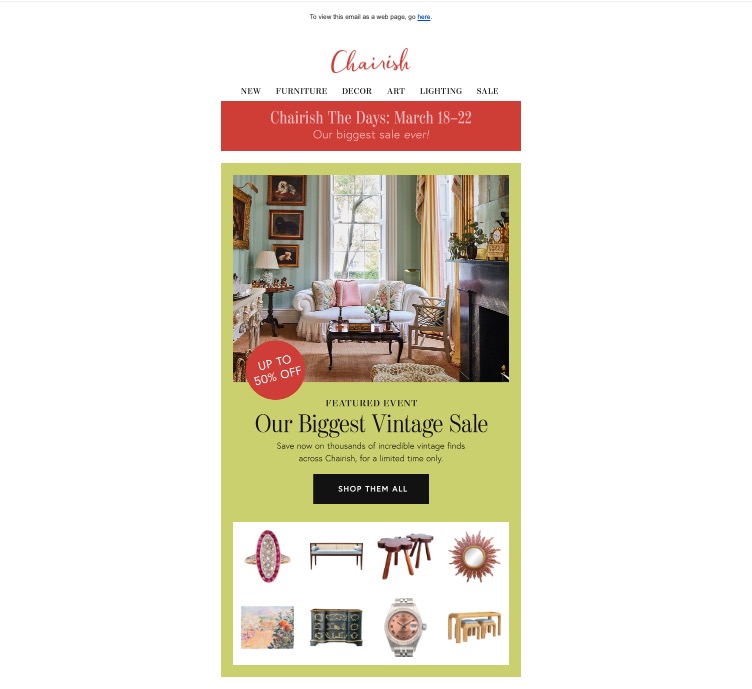
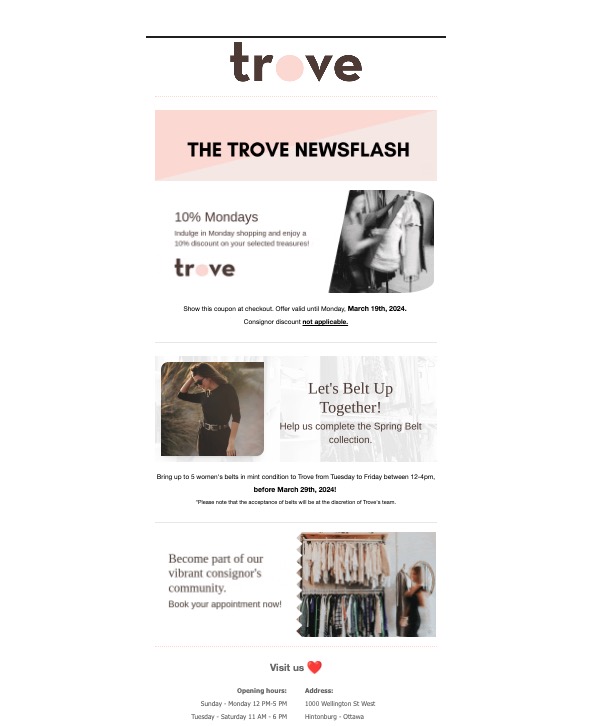
Newsletter/news roundup email
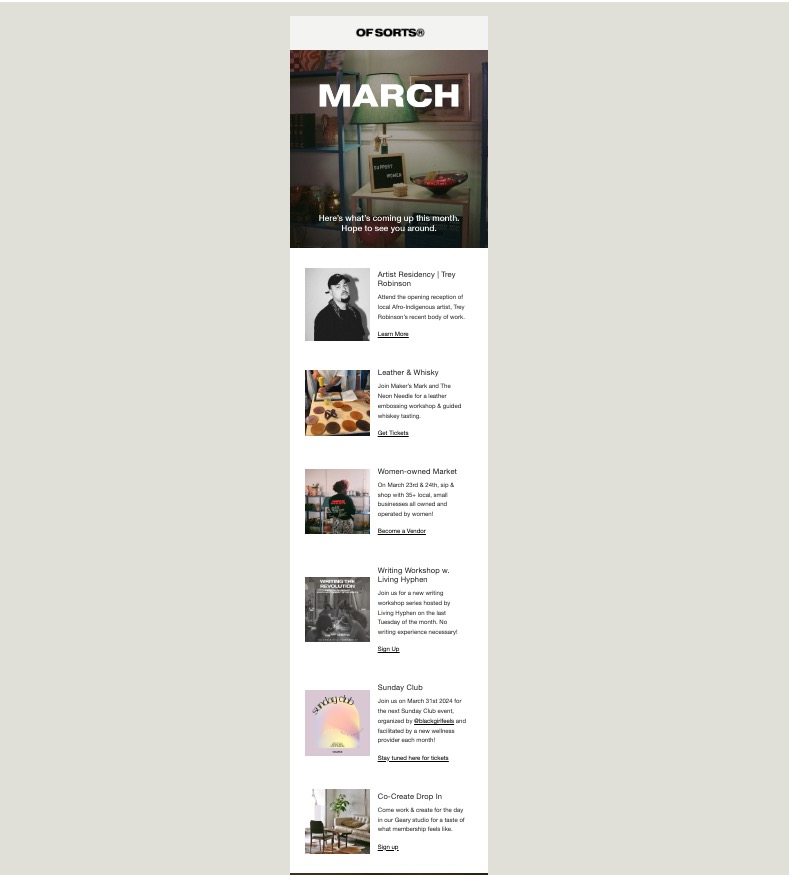
Month roundup email
In the next post, we cover one-off and automated email sequences, segmentation and more specific content ideas.
Catch up on why email is a great marketing tool and how to collect email addresses in part 1 of our series before moving onto this one.
Part two covers what the heck you should put in these emails.
What kind of content will you send?
Do you want to use emails to promote new collections, sales, drops or goings-on at your shop?
Keep them short and sweet, with a big image and a button.
Do you want to connect with your customers?
Offer them something of value, like a personal anecdote that ties into a bigger theme, or show some behind-the-scenes of what you do.
Use an e-newsletter format to expand on the kind of stuff you share on social media — give your readers some exclusive content they’re not going to see on there or on your website.
Share some extra behind-the-scenes photos, give special discounts for a sale you’re running on social media or in your Etsy shop, etc.
While email marketing is ultimately a way to promote your shop, the best ones follow the 90-10 rule, which means 90% educational content and 10% promotional content.
Stumped for content ideas? Check out this list of 50 newsletter ideas from the folks at Campaign Monitor.
Create a simple, easy-to-digest email
Emails that take longer than a few minutes to read are less likely to be…well, read. Make your emails scannable and keep them on the shorter side.
If you’re writing long paragraphs, consider breaking them up into very small chunks or even single lines. A good tip is to write your newsletter, then go back and edit with the goal of shortening it while retaining meaning.
Use headings and buttons to break up the newsletter visually. Most providers will include drag-and-drop templates that make this fairly easy to do.
Newsletters perform better when there are visuals, so include images, gifs and video when possible. Ideas for images might include:
- Product shots of your inventory
- Editorial/styled vignettes
- Personal photos
- Collages, etc.
Alt text for images (the text that’s shown when an image hasn’t loaded) is key for emails, as many people use email clients that don’t automatically show pictures. Give them a taste of what the image contains so that they'll know if they want to download the images or not.
For best results, choose responsive email templates that are mobile-friendly and that display nicely in both light mode or dark mode. You may need to send a test email to yourself to determine if it looks good in dark mode.
Choosing the right email provider
You've thought about what type of content to send, so choose the email provider that fits your goals best.
If you are running a Shopify website, they have email marketing included as a feature.
Most other email providers charge to send emails, but there are some free plans out there that will allow you to send a certain amount of emails per month for free to a limited number of subscribers.
Compare plans and pay attention to when you have to scale up to a new plan for each — most go by number of subscribers.
Some common ones:
- Mailchimp
- HubSpot
- Substack
- Moosend
- MailerLite
- Convert Kit
- AWeber
- Campaign Monitor
- Flodesk
- Shopify
- Other web hosting providers (i.e. Squarespace, GoDaddy, etc. — they tend not to be the cheapest options, though they do make integrating your website content into your e-newsletters very easy.)
What you need to know about anti-spam
All emails must have an unsubscribe button as per Canadian Anti-Spam Law (CASL), CAN-SPAM Act in the U.S., or General Data Protection Regulation (GDPR) rules in the European Union. Email providers make this very easy to include and it's built into their templates.
Anti-spam law is a bit complicated, but the most important things to know are: 1) there are two types of consent: express and implied. And 2) if you don’t follow the anti-spam rules and someone reports you, the fines can be steep (like tens of thousands of dollars steep).
Express consent is when someone has agreed (either in writing or verbally) that they want to receive a commercial email from you. Usually this means the person has signed up for your email list on their own. When you have express consent, you can email people on your list as much as you want until they say they want to unsubscribe.
A double opt-in (sending a confirmation email after they sign up to ensure they really, really want to sign up — you can set this up in most email providers quite easily) is your safest bet at ensuring your list is CASL- or CAN-SPAM compliant, but it is not required if you have express consent.
Implied consent has a time limit and is only applicable if you have an existing business relationship with the person to whom you are sending the message: for example if they have purchased something from you, sent you a question, or made their email address public (i.e. on their business website or on a business card).
Implied consent only lasts two years in most cases, meaning at that point you need to email to ask for express consent if you want to keep emailing. If you don’t get that consent, you can’t email that address anymore.
Using implied consent means constantly tracking your emails to ensure you aren’t emailing anyone outside of the two-year window.
For more information:
CASL
CAN-SPAM
GDPR
Continued below
Get 1:1 support for your shop
Book a strategy session
Continued from above
Catch up on why email is a great marketing tool and how to collect email addresses in part 1 here.
This article covers what the heck you should put in these emails.
What kind of content will you send?
Do you want to use emails to promote new collections, sales, drops or goings-on at your shop?
Keep them short and sweet, with a big image and a button.
Do you want to connect with your customers?
Offer them something of value, like a personal anecdote that ties into a bigger theme, or show some behind-the-scenes of what you do.
Use an e-newsletter format to expand on the kind of stuff you share on social media — give your readers some exclusive content they’re not going to see on there or on your website.
Share some extra behind-the-scenes photos, give special discounts for a sale you’re running on social media or in your Etsy shop, etc.
While email marketing is ultimately a way to promote your shop, the best ones follow the 90-10 rule, which means 90% educational content and 10% promotional content.
Stumped for content ideas? Check out this list of 50 newsletter ideas from the folks at Campaign Monitor.
Create a simple, easy-to-digest email
Emails that take longer than a few minutes to read are less likely to be…well, read. Make your emails scannable and keep them on the shorter side.
If you’re writing long paragraphs, consider breaking them up into very small chunks or even single lines. A good tip is to write your newsletter, then go back and edit with the goal of shortening it while retaining meaning.
Use headings and buttons to break up the newsletter visually. Most providers will include drag-and-drop templates that make this fairly easy to do.
Newsletters perform better when there are visuals, so include images, gifs and video when possible. Ideas for images might include:
- Product shots of your inventory
- Editorial/styled vignettes
- Personal photos
- Collages, etc.
Alt text for images (the text that’s shown when an image hasn’t loaded) is key for emails, as many people use email clients that don’t automatically show pictures. Give them a taste of what the image contains so that they'll know if they want to download the images or not.
For best results, choose responsive email templates that are mobile-friendly and that display nicely in both light mode or dark mode. You may need to send a test email to yourself to determine if it looks good in dark mode.
Choosing the right email provider
You've thought about what type of content to send, so choose the email provider that fits your goals best.
If you are running a Shopify website, they have email marketing included as a feature.
Most other email providers charge to send emails, but there are some free plans out there that will allow you to send a certain amount of emails per month for free to a limited number of subscribers.
Compare plans and pay attention to when you have to scale up to a new plan for each — most go by number of subscribers.
Some common ones:
- Mailchimp
- HubSpot
- Substack
- Moosend
- MailerLite
- Convert Kit
- AWeber
- Campaign Monitor
- Flodesk
- Shopify
- Other web hosting providers (i.e. Squarespace, GoDaddy, etc. — they tend not to be the cheapest options, though they do make integrating your website content into your e-newsletters very easy.)
What you need to know about anti-spam
All emails must have an unsubscribe button as per Canadian Anti-Spam Law (CASL), CAN-SPAM Act in the U.S., or General Data Protection Regulation (GDPR) rules in the European Union. Email providers make this very easy to include and it's built into their templates.
Anti-spam law is a bit complicated, but the most important things to know are: 1) there are two types of consent: express and implied. And 2) if you don’t follow the anti-spam rules and someone reports you, the fines can be steep (like tens of thousands of dollars steep).
Express consent is when someone has agreed (either in writing or verbally) that they want to receive a commercial email from you. Usually this means the person has signed up for your email list on their own. When you have express consent, you can email people on your list as much as you want until they say they want to unsubscribe.
A double opt-in (sending a confirmation email after they sign up to ensure they really, really want to sign up — you can set this up in most email providers quite easily) is your safest bet at ensuring your list is CASL- or CAN-SPAM compliant, but it is not required if you have express consent.
Implied consent has a time limit and is only applicable if you have an existing business relationship with the person to whom you are sending the message: for example if they have purchased something from you, sent you a question, or made their email address public (i.e. on their business website or on a business card).
Implied consent only lasts two years in most cases, meaning at that point you need to email to ask for express consent if you want to keep emailing. If you don’t get that consent, you can’t email that address anymore.
Using implied consent means constantly tracking your emails to ensure you aren’t emailing anyone outside of the two-year window.
For more information:
CASL
CAN-SPAM
GDPR
Make your subject lines enticing
You want your potential customers to find opening your email irresistible. Try asking a question, inviting them to take action, telling them about a deliverable, or including an emoji.
For example, a shop that is featuring a beach-themed collection might go with something like: "Bring the beach home with you with our new vintage drop" or "Fun in the sun: Shop our beach decor now!"
Some good best practices:
- Keep them fairly short
- Introduce your brand tone (maybe you are funny or cheeky)
- Use "your" and "you" (make it about your subscriber!)
- Using numbers or lists
- "Big news" etc. to entice an announcement
- Don't forget the preheader text or pretext -- the little line of copy that appears under the subject line (a great place to put a call to action, like "Save 30% on glassware!")
You may find these subject lines easy to write if you know the types of people on your email list or who your ideal customer is, but if you're having trouble coming up with some, consult this list of 75 retail subject lines from Campaign Monitor, or try ChatGPT.
Include a call to action
Your emails are a place to promote your shop URL, your social media pages, your website, etc. Don’t be shy — include them all in the footer and the most important ones in the header — but feature one main call to action (CTA) or thing you want your potential customers to do via a button.
Consider your focus — if it’s to drive traffic to your web shop, your main call to action should be to visit your shop URL.
If your goal is brand awareness, you may want to make your call to action to “share this newsletter.”
If it’s engagement, your call to action may be to ask readers a question and get them to respond to your email with a comment.
If it's to promote a sale or discount, give your subscribers a promo code and invite them to redeem the code.
Test your emails
Send yourself a test deployment of your email before you send it out and click on every link inside. It’s a proofreading opportunity, but it will also help you catch missing subject lines, misaligned images or non-working hyperlinks.
A/B testing is also a good idea — duplicate your email campaign with a different subject line and send each one to half your email list. Observe the analytics of each a few days after deployment to see which performs better, and make note for next time.
Monitor your analytics
Generally, links in the top third of a newsletter will get the most clicks. That’s because the first third is the most-read part of a newsletter. Put your most important information up near the top.
And then keep track: What kind of content is getting the most clicks? Double down on that content. Remove things or sections that aren’t getting clicks.
For more on tracking analytics for your shop, click here.
Reseller email examples
Some noteworthy promo emails and newsletters from resellers I've been receiving lately:
News announcement
Media feature/promotion/testimonial
Product email
Something is different announcement (hours change)
Drop announcement
Behind-the-scenes/service email
History/educational product email
Event email
Promotion/sale email
Newsletter/news roundup email
Month roundup email
In the next post, we cover one-off and automated email sequences, segmentation and more specific content ideas.
Thank you for valuing our work!







Support our work to see this page.
You’ve got a good eye, but this gem is only available for members. Register for a plan or upgrade your current one to peek behind this vintage curtain, or log in below.