
Want the secondhand scoop?



Listing tips from a seller: Get SEO and photography advice from Lemon’s Loot
How Ashlee Mueller, founder of Lemon’s Loot, optimizes their shop using keywords and imagery
Missed the first article in this series? Check out Simplify Your Listings Process with Lemon’s Loot here.
I recently decided to check out a website integration promoted by Etsy called E-Rank.
Since I was getting sales and views, I didn’t think I needed to add another website to help my business. I’m glad my curiosity won. A topic I’ve been focusing on in my business is improving my SEO and keyword strategy as I often overlook its power. E-Rank is advertised to help with this.
The site has many features to help improve your shop. What I am sharing is from the free plan and linked to my Etsy shop, LemonsLoot. If you don’t have an Etsy shop, there is still a ton of information on SEO/keywords, marketplace insights, shopper trends, calendar dates, profit calculators and more.
E-Rank features I found useful
1. Dashboard
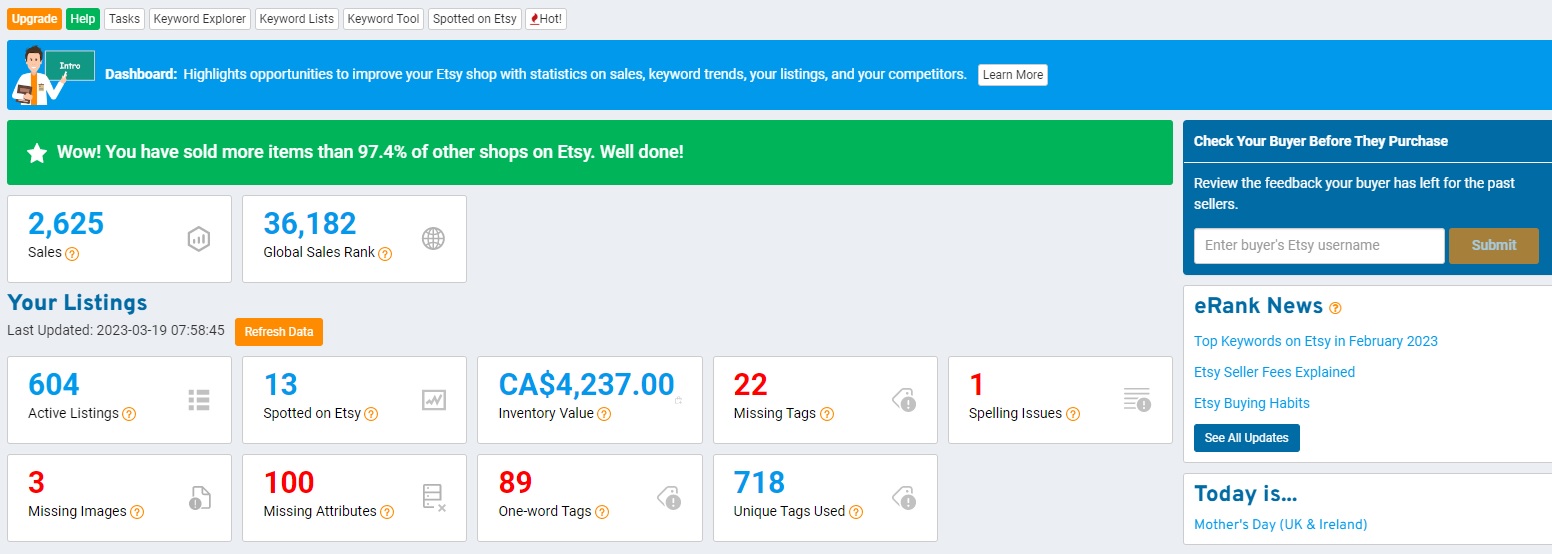
This overview gives you the option to adjust your listings and understand a few key points to drive sales. I’ve been working through the red numbers to improve the quality of my listings. I think this is a great feature to pinpoint areas you can focus on without having to review each listing manually.
2. Marketplace Popularity
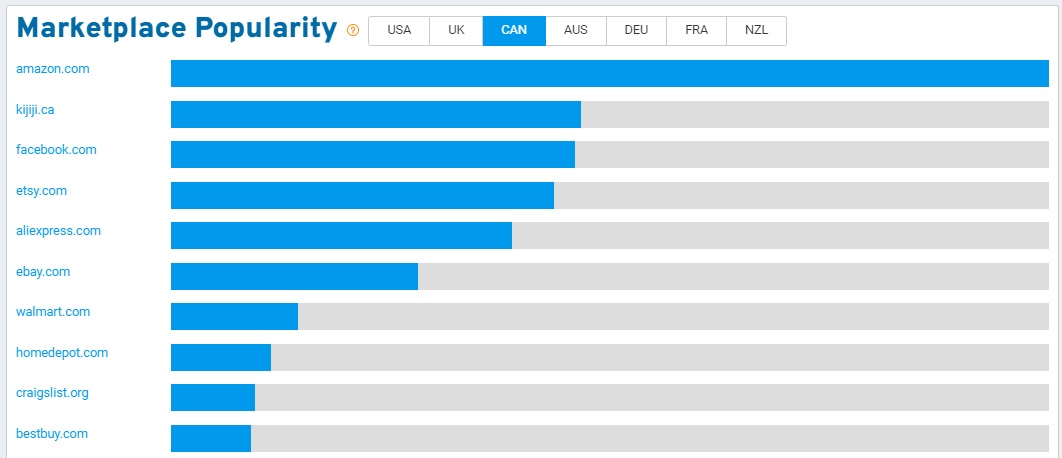
I was intrigued to see Kijiji was the second most popular marketplace in Canada. I feel this may be a “missed market” by some (including myself!).
Another interesting point (not shown) was the searched keywords:
kijiji Toronto, kijiji Montreal, kijiji Calgary, kijiji Ontario...something to consider if you are in these areas!
3. Top Keywords by Week or Month (Category – Vintage)
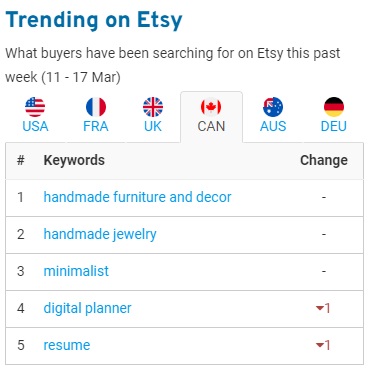
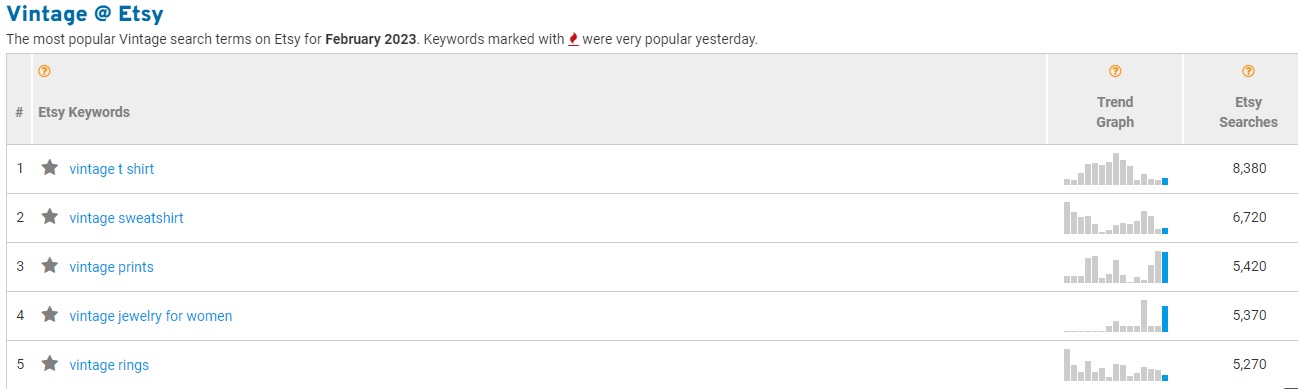
There is updated information per week and per month (this is sorted by category, I selected vintage for the example). This gives you a quick look into what customers are searching for based on keywords.
4. E-Rank News
The website also has a blog section that expands on popular topics. I appreciated reading this summary of top keywords from February. This expands on what is available with the free plan and can give more insights into different markets.
I believe a lot of this information will be valuable to sellers, no matter what platform you choose to sell on.
Continued below
Get promotional opportunities for your shop
Become a member
Continued from above
The power of listing stats
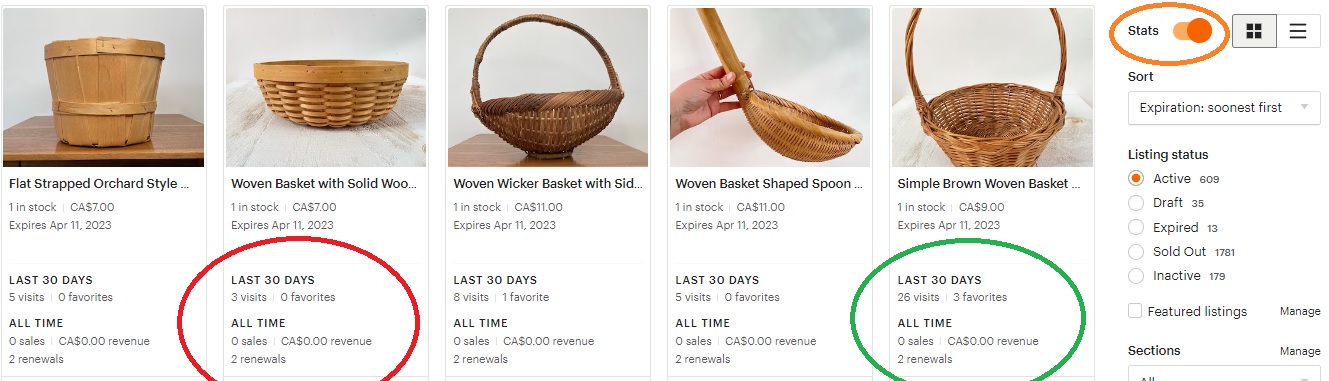
On Etsy, there is a toggle switch to show your stats. You can see how many times a listing has been renewed (one time = three months active in your shop) and the listing stats for the last 30 days. This option helps me decide how to proceed with the item. If you feel there is no improvement needed to the listing itself, you can try the tip below!
For the basket circled in green, I would simply renew the listing. The stats show 26 views and three favourites.
For the basket circled in red, I would make a copy of the listing and post it as a "new" item (then delete the original listing). The stats show three views and zero favourites.
It's been said the Etsy algorithm favours shops that post new items...but sometimes we don't have new inventory to post. Using this method can help send that "ping" to Etsy showing your an active shop who is adding "new" items to the platform. I've started doing this and I've noticed older inventory has started to sell more! I hope this helps inspire you to try this method.
Below is a photo that shows what this information looks like.
Improving your listing photography
Photography is a big topic when it comes to creating listings that grab the attention of customers. Here are a few of my own tips and tricks I use when taking photos for listings and uploading them to my Etsy shop.
1. Photo set-up space
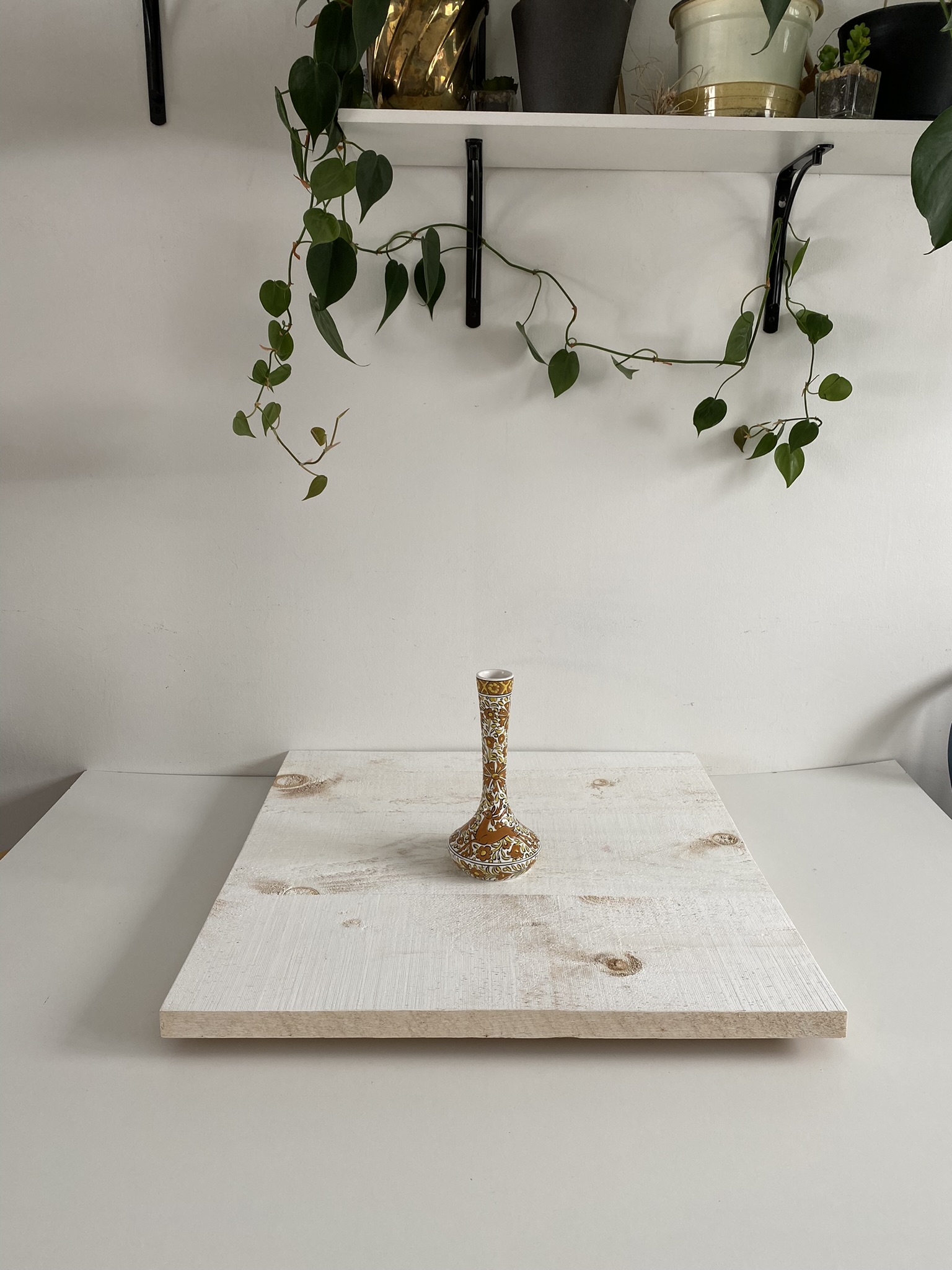
My husband built a platform that is unfinished wood boards, painted white. I set this board on top of a piece of MDF from the hardware store to bounce light from my window.

2. Item Photography
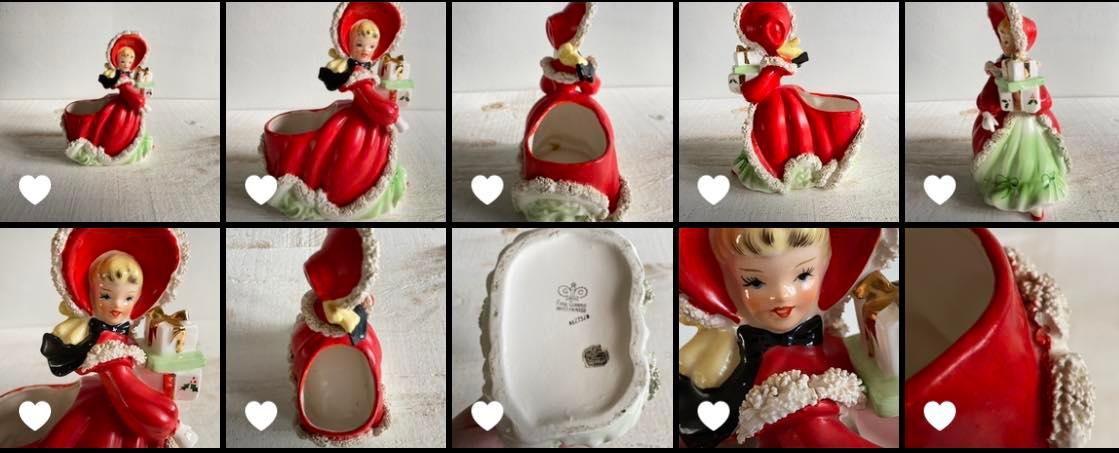
I place my item in the middle of the board. Using my phone I shoot on “photo” mode at 1x and take the following photos:
- Item with lots of room around it on all four sides
- Item filling most of the frame
- Right side of item
- Backside of item
- Left side of item
- Top of item, shot from above
- Bottom of item, either balanced on board or in my hand
- Close up of detail (to get extra close, I sometimes use 2x)
- Close up of any flaws (to get extra close, I sometimes use 2x)
3. Editing
I personally do very little editing. At times I will straighten some objects or crop them. I do this very sparingly. To straighten, I use the options on my phone, to crop I use the option on Etsy.
4. Uploading to Etsy
Add your images and arrange them in order that takes the customer on a journey. I like to but the top and bottom photos near the end, with any close ups of flaws after. Use your best images first!
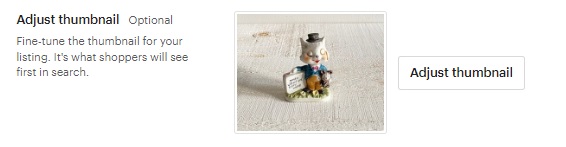
On Etsy it’s important that the first image have extra space since the thumbnail is automatically cropped.
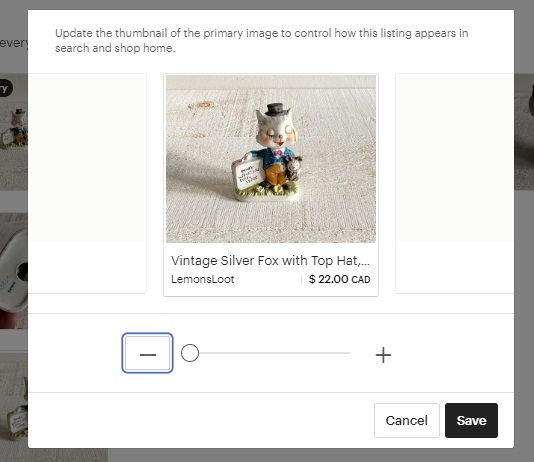
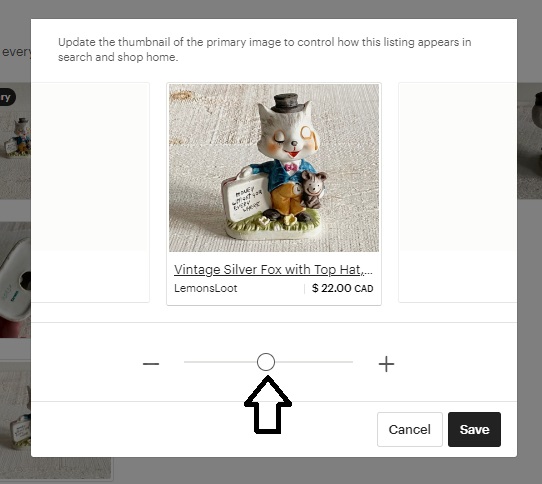
Take things one step further and adjust the thumbnail photo. Use the + option to zoom in on your item and curser to centre the image. It may be tempting to skip this step, but this makes a world of difference in the appearance of your shop!
Do you do something similar? What steps do you take when doing SEO or photographing your items? I would love to hear in the comments below!
_____
Ashlee Mueller is a vintage seller, founder of Lemon’s Loot and a member of The Vintage Seeker.
Missed the first article in this series? Check out Simplify Your Listings Process with Lemon’s Loot here.
I recently decided to check out a website integration promoted by Etsy called E-Rank.
Since I was getting sales and views, I didn’t think I needed to add another website to help my business. I’m glad my curiosity won. A topic I’ve been focusing on in my business is improving my SEO and keyword strategy as I often overlook its power. E-Rank is advertised to help with this.
The site has many features to help improve your shop. What I am sharing is from the free plan and linked to my Etsy shop, LemonsLoot. If you don’t have an Etsy shop, there is still a ton of information on SEO/keywords, marketplace insights, shopper trends, calendar dates, profit calculators and more.
E-Rank features I found useful
1. Dashboard
This overview gives you the option to adjust your listings and understand a few key points to drive sales. I’ve been working through the red numbers to improve the quality of my listings. I think this is a great feature to pinpoint areas you can focus on without having to review each listing manually.
2. Marketplace Popularity
I was intrigued to see Kijiji was the second most popular marketplace in Canada. I feel this may be a “missed market” by some (including myself!).
Another interesting point (not shown) was the searched keywords:
kijiji Toronto, kijiji Montreal, kijiji Calgary, kijiji Ontario...something to consider if you are in these areas!
3. Top Keywords by Week or Month (Category – Vintage)
There is updated information per week and per month (this is sorted by category, I selected vintage for the example). This gives you a quick look into what customers are searching for based on keywords.
4. E-Rank News
The website also has a blog section that expands on popular topics. I appreciated reading this summary of top keywords from February. This expands on what is available with the free plan and can give more insights into different markets.
I believe a lot of this information will be valuable to sellers, no matter what platform you choose to sell on.
Continued below
Get promotional opportunities for your shop
Become a member
Continued from above
The power of listing stats
On Etsy, there is a toggle switch to show your stats. You can see how many times a listing has been renewed (one time = three months active in your shop) and the listing stats for the last 30 days. This option helps me decide how to proceed with the item. If you feel there is no improvement needed to the listing itself, you can try the tip below!
For the basket circled in green, I would simply renew the listing. The stats show 26 views and three favourites.
For the basket circled in red, I would make a copy of the listing and post it as a "new" item (then delete the original listing). The stats show three views and zero favourites.
It's been said the Etsy algorithm favours shops that post new items...but sometimes we don't have new inventory to post. Using this method can help send that "ping" to Etsy showing your an active shop who is adding "new" items to the platform. I've started doing this and I've noticed older inventory has started to sell more! I hope this helps inspire you to try this method.
Below is a photo that shows what this information looks like.
Improving your listing photography
Photography is a big topic when it comes to creating listings that grab the attention of customers. Here are a few of my own tips and tricks I use when taking photos for listings and uploading them to my Etsy shop.
1. Photo set-up space
My husband built a platform that is unfinished wood boards, painted white. I set this board on top of a piece of MDF from the hardware store to bounce light from my window.
2. Item Photography
I place my item in the middle of the board. Using my phone I shoot on “photo” mode at 1x and take the following photos:
- Item with lots of room around it on all four sides
- Item filling most of the frame
- Right side of item
- Backside of item
- Left side of item
- Top of item, shot from above
- Bottom of item, either balanced on board or in my hand
- Close up of detail (to get extra close, I sometimes use 2x)
- Close up of any flaws (to get extra close, I sometimes use 2x)
3. Editing
I personally do very little editing. At times I will straighten some objects or crop them. I do this very sparingly. To straighten, I use the options on my phone, to crop I use the option on Etsy.
4. Uploading to Etsy
Add your images and arrange them in order that takes the customer on a journey. I like to but the top and bottom photos near the end, with any close ups of flaws after. Use your best images first!
On Etsy it’s important that the first image have extra space since the thumbnail is automatically cropped.
Take things one step further and adjust the thumbnail photo. Use the + option to zoom in on your item and curser to centre the image. It may be tempting to skip this step, but this makes a world of difference in the appearance of your shop!
Do you do something similar? What steps do you take when doing SEO or photographing your items? I would love to hear in the comments below!
_____
Ashlee Mueller is a vintage seller, founder of Lemon’s Loot and a member of The Vintage Seeker.
Thank you for valuing our work!




Want the secondhand scoop?
Support our work to see this page.
You’ve got a good eye, but this gem is only available for members. Register for a plan or upgrade your current one to peek behind this vintage curtain, or log in below.